
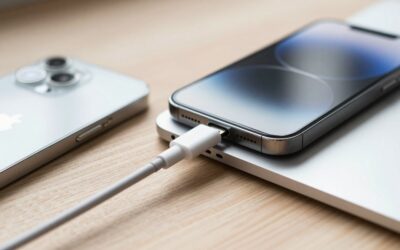
The iPhone 17 lineup runs entirely on USB-C, and that single change makes choosing the right USB cable for iPhone 17 more important than it has ever been. The cable in the box works, but it is a modest USB 2.0 charge cable that leaves fast charging and blazing data transfer speeds on the table. Pick the right third-party cable and you unlock quicker top-ups, 10Gbps file transfers, and braided durability that survives years of being yanked out of a wall.
As an Amazon Associate we earn from qualifying purchases at no extra cost to you.





This 2026 guide rounds up the best USB cable for iPhone 17 across every use case, from a bedside fast charger to a studio-grade data cable for offloading ProRes video. We weighed charging wattage, real data throughput, connector build, and length so you can match a cable to how you actually use your phone.
As an Amazon Associate I earn from qualifying purchases.
Best USB Cable for iPhone 17: Top Picks
Here are the standouts, compared at a glance. Note the split between charge-focused cables and high-speed data cables, since the fastest chargers are not always the fastest at moving files.
| Product | Key Spec | Best For | Rating |
|---|---|---|---|
| Apple USB-C Charge Cable | 60W charge, USB 2.0 data | Guaranteed compatibility | 4.7/5 |
| Anker 765 USB-C to USB-C | 140W, braided nylon | Fast charging | 4.8/5 |
| Apple Thunderbolt 4 Pro | 40Gbps data, 100W | Pro video transfer | 4.7/5 |
| Belkin USB-C to USB-C 240W | 240W EPR, 480Mbps | Heavy-duty charging | 4.6/5 |
| Anker USB-C to USB-C (10Gbps) | 10Gbps data, 100W | Balanced value | 4.6/5 |
| Cable Matters USB4 Cable | 40Gbps, 240W | Future-proofing | 4.5/5 |
| Nomad Kevlar USB-C | 100W, Kevlar-reinforced | Durability | 4.5/5 |
| UGREEN USB-C to USB-C 3-Pack | 100W, multiple lengths | Value multipacks | 4.4/5 |
Understanding what your iPhone 17 cable needs to do
Every USB cable for iPhone 17 uses a USB-C connector, but two different specs matter underneath. Charging speed depends on the cable’s power rating in watts, while transfer speed depends on its data standard. The base iPhone 17 caps data at USB 2.0 speeds of 480Mbps regardless of the cable, so a pricey 40Gbps cable only pays off on the Pro models, which support USB 3 and Thunderbolt transfer rates.
Apple USB-C Charge Cable: the safe default
Apple’s own braided cable is the no-surprises choice. It handles up to 60W of charging, which fully covers the iPhone 17’s fast-charge ceiling, and the woven jacket resists fraying far better than the old rubber cables. Its one limitation is USB 2.0 data, so it is a charger first and a data cable a distant second. For most people who just want a reliable cable that always works, it is money well spent.
Anker 765: the fast-charging champion
If charging speed is your priority, the Anker 765 delivers up to 140W, far more than any iPhone needs, which means it never becomes a bottleneck and can also top up a MacBook. The double-braided nylon jacket is rated for tens of thousands of bends. As the best USB cable for iPhone 17 owners who also carry a laptop, it is a single cable that does everything on the power side.
Apple Thunderbolt 4 Pro and USB4 cables: for the Pro models
iPhone 17 Pro and Pro Max support high-speed transfer, and that is where a Thunderbolt or USB4 cable earns its premium. Offloading a folder of ProRes clips over a 40Gbps cable takes seconds instead of minutes compared to USB 2.0. The Cable Matters USB4 option delivers the same 40Gbps at a lower price with 240W power headroom, making it a compelling alternative for creators who move large files daily.
Belkin 240W and heavy-duty charging cables
Belkin’s 240W EPR cable is built for a mixed device drawer, charging your iPhone, iPad, and a power-hungry laptop from one wire. The connectors are reinforced and the cable carries safety certifications that give peace of mind at high wattage. Data tops out at 480Mbps, so treat it as a charging workhorse rather than a transfer cable.
Durability picks: Nomad Kevlar and braided options
For a cable that survives backpacks and daily abuse, the Nomad Kevlar-reinforced USB-C cable is engineered around a bulletproof-fiber core. Braided cables in general resist the kinking and jacket splits that kill cheap cables at the connector. If you have replaced a frayed cable more than once, spending a little more on build quality pays for itself.
Budget multipacks worth buying
You do not need to spend big to keep a cable in every room. UGREEN’s 100W three-pack includes multiple lengths so you can stash one at your desk, one by the bed, and one in your bag. They charge at full iPhone 17 speed and carry the same USB 2.0 data as Apple’s cable, making them an outstanding value for a whole household.
How to Choose the Best USB Cable for iPhone 17
Decide whether you need charging or data speed
This is the first fork. If you mostly plug in overnight, any 60W-plus cable is plenty and you can ignore data ratings entirely. If you shoot video on an iPhone 17 Pro and transfer to a Mac, prioritize a USB3 or Thunderbolt cable, since only those unlock the phone’s high-speed offload.
Check the wattage against your charger
A cable can only deliver as much power as your adapter provides, and vice versa. The iPhone 17 fast-charges best on a 30W or higher adapter, so pair it with a cable rated at least 60W. Higher-wattage cables never harm your phone; the device only draws what it needs.
Prioritize connector and jacket quality
Most cables fail at the strain point where the wire meets the plug. Braided nylon or Kevlar jackets and molded connector collars dramatically extend lifespan. This is the single best predictor of how long a USB cable for iPhone 17 will last, so weight it heavily over marginal spec differences.
Match the length to the use case
A short cable is tidier on a desk and slightly faster for data integrity, while a longer six-foot cable reaches from a wall outlet to a couch or bed. Buying a mix of lengths, often cheapest as a multipack, means you always have the right one on hand.
Frequently Asked Questions
Does the USB cable for iPhone 17 affect data transfer speed?
Yes, but only on the Pro models. The standard iPhone 17 caps data at USB 2.0 speeds of 480Mbps no matter which cable you use, so a high-speed cable brings no transfer benefit there. The iPhone 17 Pro and Pro Max support USB 3 and Thunderbolt rates, where a 10Gbps or 40Gbps cable dramatically speeds up offloading large video files.
Can I use my old iPhone Lightning cable with the iPhone 17?
No. The entire iPhone 17 lineup uses a USB-C port, so Lightning cables no longer fit. You will need a USB-C to USB-C cable for charging from modern adapters, or a USB-C to USB-A cable if your charger or computer still uses the older rectangular port. This is the biggest cable change for anyone upgrading from an iPhone 14 or earlier.
What wattage USB cable for iPhone 17 should I buy?
A cable rated for 60W or higher fully covers the iPhone 17’s fast-charging needs with room to spare. Higher ratings like 140W or 240W do no harm and let the same cable charge a laptop, since the phone only ever draws the power it requires. Pair the cable with a 30W or greater adapter to hit the fastest charge times.
Is a braided USB cable for iPhone 17 worth the extra cost?
For most people, yes. Braided nylon and Kevlar jackets resist the fraying, kinking, and connector splits that destroy cheap rubber cables within a year. Given that a durable cable often lasts several times longer, the modest price premium usually works out cheaper over time and spares you the frustration of a cable failing right when you need to charge.
Will any USB-C cable charge my iPhone 17 safely?
Any properly certified USB-C cable will charge the iPhone 17 safely, since the phone and cable negotiate a safe power level automatically. The risk comes from uncertified, no-name cables that may lack proper resistors and can deliver unstable power. Stick to reputable brands like Apple, Anker, Belkin, or UGREEN, and look for USB-IF certification for guaranteed safety.
Related reading: best fast chargers for iPhone 17, iPhone 17 MagSafe accessories, USB-C power banks for iPhone, iPhone 17 vs iPhone 16 comparison, best USB-C hubs 2026, and how to transfer ProRes video from iPhone.
Write Your Review
No reviews yet. Be the first to share your experience!