
Best usb c to displayport cable choice determines how smoothly your external display operates. Connecting modern laptops to high resolution monitors often causes screen flickering or reduced refresh rates. This complete guide helps you solve display issues by reviewing dependable choices for professional and gaming configurations.
How to Choose the Right DisplayPort Cable
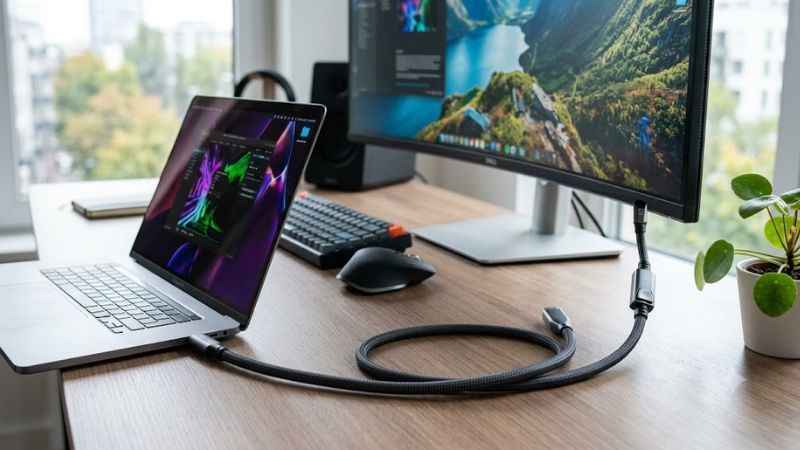
Searching for the best usb c to displayport cable requires evaluating several key technical specifications to match your monitor. Choosing the correct video cord ensures smooth image transmission without screen flickering. Understanding resolution capabilities, bandwidth limits, and physical build quality makes your purchase decision much easier today.
As an Amazon Associate we earn from qualifying purchases at no extra cost to you.


![BENFEI USB-C to DisplayPort 6 Feet Cable(4K@60Hz 2K@144Hz), USB Type-C to DisplayPort Cable [Thunderbolt 3/4 Compatible] with iPhone 15 Pro/Max, MacBook Pro/Air 2023, iPad Pro, iMac, S23, XPS 17](https://m.media-amazon.com/images/I/41NeLGUIL3L._SL160_.jpg)
![Warrky USB C to DisplayPort Cable 8K@60Hz 4K@240/144Hz [Gold-Plated Plug]](https://m.media-amazon.com/images/I/41gTvBMHUvL._SL160_.jpg)


Resolution Support and Refresh Rates
Display capabilities depend heavily on the bandwidth standard supported by your chosen video cord. Modern high-end monitors demanding 4K at 144Hz or 8K at 60Hz require DisplayPort 1.4 specifications. Selecting a lower specification model can limit your monitor performance to basic 60Hz output, restricting competitive gaming experiences.
Gamers and creative professionals should verify that their computer hardware supports DisplayPort Alternate Mode over Type C. High refresh rates eliminate motion blur during fast gameplay, providing noticeable fluidity. Checking bandwidth ratings before purchase prevents unexpected frame drops and guarantees maximum visual performance on high resolution screens.
Build Quality and Shielding Materials
Cable durability directly impacts signal integrity and overall product lifespan over years of daily use. Premium models feature double-braided nylon exterior sleeving paired with aluminum alloy housing shells. These robust protective layers resist fraying from repeated bending while effectively dissipating heat during extended screen display sessions.
Internal construction quality remains equally important for preventing electromagnetic interference from nearby electronics. 24K gold-plated connectors resist corrosion while maintaining tight physical connections inside host devices. Multi-layer foil shielding isolates video signals, ensuring crystal clear picture delivery without sudden audio drops or screen flickering.
Device Compatibility and Length
Hardware compatibility spans various operating systems, including macOS, Windows, iPadOS, and ChromeOS devices. Finding the best usb c to displayport cable means checking Thunderbolt 3 and Thunderbolt 4 port support. Ensure your source laptop output matches the target monitor input specification to enjoy seamless plug and play functionality without extra drivers.
Selecting the optimal cord length prevents unnecessary clutter across your desktop workspace setup. Standard options range from three feet to ten feet depending on desktop arrangement requirements. Longer distances require higher quality internal wire gauges to maintain full signal strength without suffering signal degradation over extended wire lengths.
Top Picks for High Performance Displays
Selecting the best usb c to displayport cable involves comparing top performers across distinct user categories. Whether you need extreme gaming refresh rates or steady office monitor reliability, choosing tested hardware guarantees results. The following product reviews showcase outstanding marketplace options tailored to various budget levels.
Uni USB C to DisplayPort Cable
This versatile video cord targets budget conscious users who desire robust construction and reliable daily performance. Ideal for office workers and students, it delivers stable 4K video at 60Hz refresh rates. The nylon braided outer layer prevents tangles while reinforced strain relief protects stress points against accidental bending damage over time.
Key advantages include affordable pricing, sleek aluminum housing, and broad device compatibility across modern laptops. However, competitive gamers may find the 60Hz limit insufficient for high frame rate gaming setups. Despite lacking DisplayPort 1.4 bandwidth, it remains an exceptional value choice for general productivity tasks.
Cable Matters USB C to DisplayPort 1.4 Cable
Designed specifically for enthusiast gamers and video editors, this premium cable supports demanding 8K at 60Hz and 4K at 144Hz signals. It represents the best usb c to displayport cable option for users who require maximum bandwidth and zero latency. The robust latching connector ensures a secure attachment directly into high end gaming monitors.
Notable strengths encompass high bandwidth capabilities, HDR video support, and full compatibility with Nvidia G-Sync monitors. On the downside, the rubberized exterior coating feels stiffer than braided alternatives, making tight bends behind desks slightly challenging. Nevertheless, its raw performance makes it top tier for serious gaming setups.
Anker USB C to DisplayPort Cable
Targeting mobile professionals and MacBook owners, this sleek accessory focuses on compact portability and reliable connectivity. It effortless drives 4K monitors at smooth 60Hz rates without requiring driver installation. The minimal housing aesthetic matches modern ultrabooks while providing durable internal copper shielding for clean signals.
Main benefits involve trusted brand reliability, lightweight design, and flawless plug and play operation across operating systems. The primary drawback is its slightly higher price relative to standard 4K options without offering 144Hz support. It remains a trustworthy companion for travelers needing dependable display connections on the go.
| Model Name | Maximum Resolution | DisplayPort Version | Primary Best Use Case | | Uni Cable | 4K at 60Hz | DisplayPort 1.2 | Everyday Productivity | | Cable Matters | 8K at 60Hz / 4K at 144Hz | DisplayPort 1.4 | High Refresh Gaming | | Anker Cable | 4K at 60Hz | DisplayPort 1.2 | Travel and Mobile Work |
Frequently Asked Questions
Addressing common technical questions helps clarify performance expectations before investing in new monitor hardware. Finding the best usb c to displayport cable requires understanding hardware limitations across laptops and screens. The following answers clear up frequent confusion regarding video protocols, refresh rates, and adapter usage.
Does USB C to DisplayPort support 144Hz refresh rates?
Yes, these connection cords can easily support 144Hz refresh rates provided you choose hardware rated for DisplayPort 1.4 standards. Achieving high frame rates requires both your computer graphics processor and target monitor to support DP Alt Mode over Type C connection ports. High bandwidth cables transmit fast data rates required for 144Hz.
Using older DisplayPort 1.2 rating options may limit your display output to 60Hz when running demanding 4K screen resolutions. Always verify that your laptop port supports video output signals rather than basic data transfer or charging functions. Checking hardware specs beforehand guarantees smooth 144Hz performance in competitive games.
Are USB C to DisplayPort cables bidirectional?
Most standard video cords sold online are unidirectional, transmitting video signals exclusively from a USB C source to a DisplayPort monitor. If you attempt to connect a DisplayPort computer output to a USB C monitor, standard options will not function. Choosing the best usb c to displayport cable requires identifying signal direction.
Bi-directional models do exist within specialty product categories, allowing signal flow in either physical direction between devices. These specialized accessories clearly indicate bi-directional compatibility on packaging materials. Always confirm your intended signal flow direction prior to buying to prevent purchasing incompatible hardware.
Do you need drivers for USB C to DisplayPort adapters?
No software drivers are required because these display accessories operate using native DisplayPort Alternate Mode protocols. Operating systems like Windows, macOS, ChromeOS, and Linux automatically detect the connected monitor upon physical plug insertion. Signal conversion happens directly at the hardware layer without background system processes.
If your connected display fails to display video immediately upon plug connection, verify that your host USB C port supports DP Alt Mode. Some basic computer ports only handle USB data transfer or power delivery tasks. Updating your primary graphics card drivers can also resolve display recognition issues on modern workstation computers.
Is DisplayPort better than HDMI for PC gaming monitors?
DisplayPort generally offers superior bandwidth limits compared to standard HDMI ports found on desktop gaming monitors. It supports adaptive sync technologies like Nvidia G-Sync and AMD FreeSync more reliably across varied refresh rate ranges. PC gamers typically prefer DisplayPort connections to achieve peak visual fluidity and low latency.
HDMI remains widely popular for television screens and home theater setups, but DisplayPort dominates high performance desktop monitors. Using modern DisplayPort connections unlocks higher refresh rates at elevated resolutions like 1440p or 4K. Evaluating your monitor available input ports helps determine whether DisplayPort is your best choice.
Final Thoughts
Selecting the best usb c to displayport cable depends on your specific display resolution goals and budget preferences. Gamers should prioritize DisplayPort 1.4 models for 144Hz support, while office workers can rely on standard 4K 60Hz options. Investing in quality build materials ensures long lasting visual performance for all your monitor needs.
Write Your Review
No reviews yet. Be the first to share your experience!